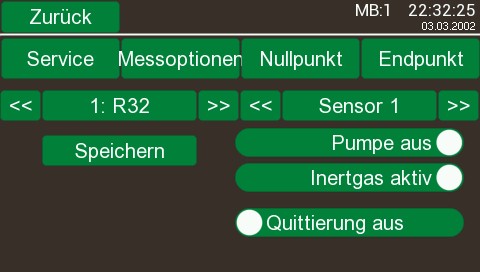
In diesem Dialog verzweigen Sie in weitere Einstellungen für den Sensor aufgerufen. Beachten Sie auch hier bitte, das je nach verbauten Sensor einigen Schaltflächen nicht vorhanden sein können.
•
|
the push button closes the dialog and returns to the precemding dialog window
|
•
|
the push button measuring options opens the dialog window - measuring options-
|
•
|
the push button Service opens the dialog window Service auf
|
•
|
the push buttonzeropoint opens the dialog window Nullpunkt auf
|
•
|
the push button limit point opens the dialog window limit point auf
|
•
|
the push button << and >> changes between the adjustments of the included sensors if more than one are included.
|
•
|
the push button umpe on switches the measuring gas pump on/off.
|
•
|
the push button Inertgas activ switsches between forming gas and inert gas (only oxygen tace analyser).
|
•
|
the push button receipt on has influence to the messages shown at the main display - there exceedances of the limet are shown.
|
|
|
•
|
for more than one measuring range you can choose one on the left side , the choosed channal and the name of the measuring gas are shown.
!
|
•
|
after choosing the measuring range it is necessary to press the button -save- to activate the adjustments.
|
|
|
|